
The demo ran 47 minutes. They asked about the reporting module. They asked about your API. Someone on the call said “this could genuinely replace what we have.” You sent a recap and a recording that afternoon. It’s been nine days. Nothing.
Post-demo silence is the most expensive problem in B2B sales — and it’s almost always caused by the follow-up, not the demo. Sopro (2025) found that 86% of B2B deals stall after initial engagement, and 33% of prospects go completely quiet. Meanwhile, research aggregated by Invesp shows 80% of closed deals required five or more follow-ups — yet 44% of reps abandon the effort after one attempt.
The templates below cover every post-demo scenario you’ll face in a SaaS sales cycle. They’re designed to be copy-paste ready — personalize the placeholders in brackets, hit send, and keep the deal moving.
Quick list — The 10 Templates at a Glance
Use this as your reference guide. Each template links to the full copy below.
- The “Immediate Momentum” Recap — send within 2 hours
- The “Executive Summary” for the CFO — ROI-focused, under 100 words
- The “Ghosting” Script — for 7+ days of silence
- The “Champion Enabler” — designed to be forwarded internally
- The “Technical Deep-Dive” — for CTOs and security leads
- The “Interactive Walkthrough” — with a SwiftDemos link
- The “New Stakeholder” Intro — when someone new joins the thread
- The “Social Proof” Follow-up — adding a case study
- The “Pricing and Mutual Action Plan” — moving to next steps
- The “Last-Ditch” Hail Mary — your final attempt
Key Takeaways
Winning reps send 8.21 follow-ups per week vs 1.87 for losing reps (Gong, 2025). Most deals don’t die in the demo — they die in the follow-up silence that follows. Use a different template for each scenario, space your touchpoints 3–7 days apart, and add new value with every send.
Section 01 — Why Your Current Follow-Up Email Gets Ignored
Winning sales reps send an average of 8.21 follow-up emails per week — nearly four times more than losing reps, who average just 1.87 (Gong, 2025). But volume alone doesn’t explain the gap. What actually separates the two groups is what those emails contain.
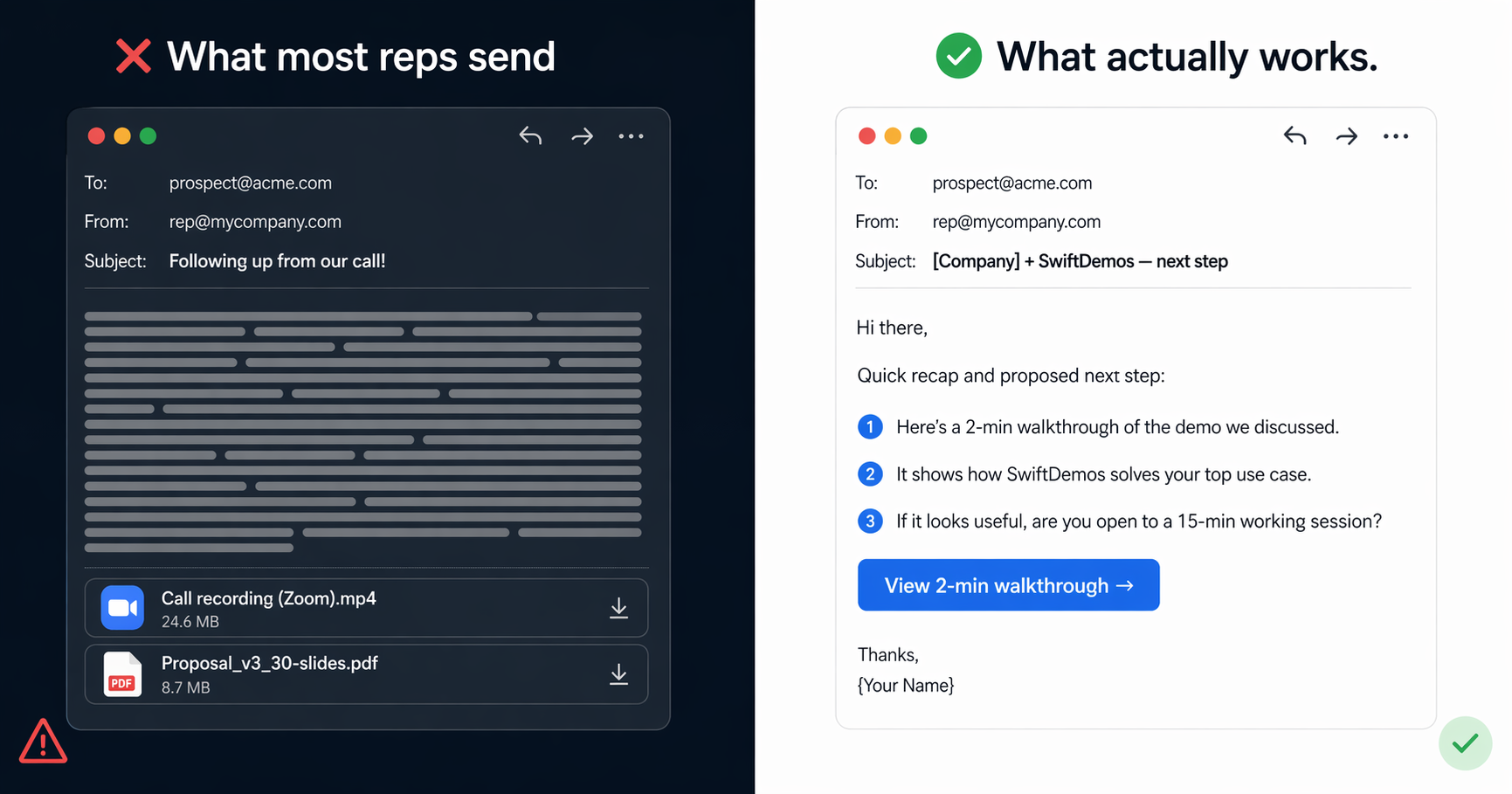
The standard post-demo follow-up fails because it creates work for the buyer:
- The Zoom recording. Forty-five minutes long. Nobody watches it — not even your champion.
- The slide deck. No narration. No context. A 30-slide PDF that made sense with a presenter becomes a confusing wall of screenshots when opened alone.
- The “just checking in” email. Adds zero new information. Communicates that you’re monitoring, not advising.
Each of these treats the prospect as a passive recipient. But the real problem is what happens next. The average B2B buying committee involves 6–10 stakeholders (Gartner, 2025) — and your champion has to re-sell your product internally to every one of them. In meetings you’ll never be invited to. Without the right tools.
That’s what these templates fix. They don’t just remind the prospect you exist — they equip your champion to win the internal meeting. For the full strategic framework behind this, including the Demo-to-Close process, see our post-demo follow-up strategy guide. For the deeper reason gated demos compound this problem, read why gated demos lose deals.
Section 02 — The 10 Essential Follow-Up Templates
Each template below includes a recommended send window, a subject line, and a ready-to-personalize body. Replace all bracketed text with specifics from your actual call.
1. The “Immediate Momentum” Recap
When to send: Within 2 hours of the demo ending. This is your most important email — while buying intent is highest and the conversation is still fresh, a fast, specific recap signals that you listened and that you’re easy to work with.
Subject: [Company Name] + SwiftDemos — next step
Hi [First Name],

Thanks for the time today. Three things I want to make sure are clear before you share anything internally:

1. The workflow we showed around [specific feature/use case] maps directly to your [stated pain point].
2. [Integration or concern they raised] — I'll send the technical doc by [specific day].
3. Our suggested next step is [specific next action] — does [day/time] work?

No decks attached. If it would help your team to see the [feature/workflow] again without scheduling another call, I can send an interactive walkthrough in about 10 minutes.

[Your name]
Why it works: Uses the commitment and consistency principle — three specific, low-effort things to agree with, followed by one small ask. Once someone has confirmed three points, declining the next step feels inconsistent. No recording link, no bloated deck — just evidence you paid attention and a single yes-or-no CTA.
2. The “Executive Summary” for the CFO
When to send: Day 1–2, as a separate email specifically written for the economic buyer. Your champion will probably forward this. Write it for someone who wasn’t on the call, has 90 seconds, and cares only about ROI and risk.
Subject: SwiftDemos — 90-second business case for [Company Name]
Hi [CFO/VP Finance name],

[Champion's name] suggested I reach out directly. Here's the short version:

Problem we solve: [1 sentence on the pain — e.g., "Your team currently spends [X hours] manually building demo environments before each sales call."]

What we deliver: [Specific, quantified outcome — e.g., "Teams using SwiftDemos cut demo prep time by 70% and close 23% more deals in the first 90 days."]

Investment: [Price] — full details at swiftdemos.com/pricing
Timeline to value: [Realistic implementation estimate]
Risk: [Trial/POC offer or money-back framing]

[Champion's name] has seen a full walkthrough. Happy to schedule 20 minutes if you'd like to see the numbers in more detail.

[Your name]
Why it works: Speaks directly to the economic buyer’s framework: cost, risk, and return. CFOs don’t evaluate features — they evaluate business cases. The structure (problem → outcome → investment → risk) maps to their mental model. The email stays under 120 words on purpose; brevity signals respect for their time and confidence in the offer.
3. The “Ghosting” Script (Permission to Close)
When to send: After 7+ business days of silence. Don’t check in, don’t add value — just ask permission to close the file. The standard “just wanted to follow up” gets deleted. This one gets replied to.
Subject: Closing your file on [Company Name]?
Hi [First Name],

Usually when I stop hearing back after a demo, it means one of two things: either priorities shifted, or the timing just isn't right.

Both are completely fine — I just don't want to keep landing in your inbox unnecessarily.

Should I close out your file for now, or is SwiftDemos still on the radar for this quarter?

[Your name]
Why it works: This uses loss aversion — people instinctively resist having files “closed” on them, even when they’ve been too busy to respond. The binary question (“close the file” or “still on the radar”) makes the reply effortless: it’s a one-sentence answer, not a 10-minute email to write. You’ll get one of three responses: a “yes close it,” a “no wait, I was just swamped,” or a timeline. All three move you forward.
4. The “Champion Enabler”
When to send: Day 3–5. This email is not for your champion — it’s for whoever your champion needs to convince next. Write it so they can forward it word-for-word without editing.
Subject: Ready to forward to [Boss’s name] — SwiftDemos summary
Hi [Champion's name],

I've summarized the ROI and included the interactive walkthrough below so you can just hit "Forward" to [Boss's name] without having to re-explain the technical bits.

---

Hi [Boss's name],

[Champion's name] asked me to send over a quick summary of SwiftDemos.

The problem we solve: [Their stated pain point in 1 sentence]
What changes: [Specific outcome — e.g., "Demo prep drops from 4 hours to 20 minutes. Win rates improve 23% in 90 days."]
Try it yourself (2 min, no login): [interactive demo link]
Pricing: swiftdemos.com/pricing

Is a 20-minute call worth it this week?

[Your name] | SwiftDemos
Why it works: Most champions aren’t salespeople — they’ll stumble trying to re-explain your product from memory in an internal meeting. This template eliminates that problem entirely. The two-part structure (personal note on top, forwardable block below the divider) means your champion does zero work. They read the top, then hit Forward. The ending question is low-friction: “Is a 20-minute call worth it?” requires a Yes or No, not a paragraph.
5. The “Technical Deep-Dive” for the CTO or Security Lead
When to send: When a technical stakeholder is added to the thread or when your champion says “our CTO has questions.” Send before they ask, not after.
Subject: SwiftDemos — technical details for [CTO/Security Lead name]
Hi [Technical Stakeholder Name],

[Champion's name] mentioned you might have questions about how SwiftDemos handles [specific technical concern — e.g., data isolation, SSO, API access].

Short answers:

Infrastructure: [Cloud provider, data residency, SLA uptime %]
Auth: [SSO support — SAML 2.0, Okta, Azure AD, etc.]
Data: [How demo data is handled — no production data used, isolated environments, etc.]
API: [Access level, rate limits, webhooks]
Security: [SOC 2 / ISO / GDPR compliance status]

I can send our full security documentation under NDA, or schedule a call with our solutions engineer for [day/time]. What works best?

[Your name]
Why it works: Uses specificity as a trust signal. A vague “we take security seriously” is worthless to a CTO. Specific answers to unasked questions signal that you’ve been through this before and have nothing to hide. The format (key: value) is also how engineers think — which makes it scannable in 30 seconds. The CTA is low-friction: “NDA doc or 20-min call?” is a choice, not a blank question.
6. The “Interactive Walkthrough” Follow-up
When to send: Any time in the sequence when you sense the buyer would benefit from revisiting the product — or when you want to reach stakeholders who missed the live call. An interactive demo link is the most effective follow-up asset in the sequence.
Subject: Custom 2-min walkthrough of [specific workflow] for [Company Name]
Hi [First Name],

I built a custom interactive walkthrough of [the specific feature/workflow] for [Company Name] — based on what we discussed, not a generic product tour.

Here it is: [SwiftDemos interactive link]

Unlike a Zoom recording, you don't have to scrub through 45 minutes of video. It's a clickable environment where you step through the actual workflow at your own pace — takes under 2 minutes. No login, no sandbox setup, no help from IT required.

Anyone on your team can open it directly. Is this week a good time to connect if it raises questions for [CTO/CFO/end users]?

[Your name]
Why it works: This template sells time saved, not features. Busy executives won’t watch a 45-minute recording — but they’ll click through a 2-minute interactive demo at their desk between meetings. The “unlike a Zoom recording” line pre-empts the most common objection before it’s raised. Interactive content generates twice the engagement of passive formats (Outgrow, 2025), and unlike static emails, SwiftDemos tells you exactly when and how long each stakeholder engaged. To learn more about what makes interactive demos effective, see our guide on what an interactive product demo actually is.
7. The “New Stakeholder” Introduction
When to send: When your champion adds a new name to the thread or tells you a new decision-maker has been brought in. Don’t assume this person has any context. They don’t.
Subject: SwiftDemos intro for [New Stakeholder’s name]
Hi [New Stakeholder Name],

[Champion's name] added you to this thread, so I wanted to give you a quick overview so you're not starting cold.

Context: [One sentence on what problem brought SwiftDemos into the conversation]

What [Company Name] saw in the demo: [2–3 bullet points matching their role — e.g., if they're in finance, lead with ROI; if they're in IT, lead with security]

Where we are in the process: [Current stage — evaluation, pilot, commercial review]

Fastest way to get up to speed: [Link to interactive demo — 3 minutes] or I can schedule a focused 20-minute call for you specifically.

[Your name]
Why it works: Uses proactive framing — you send context before the stakeholder has to ask for it, which positions you as organized and easy to work with. A new evaluator who gets brought up to speed in 3 minutes is far less likely to trigger a full restart of the evaluation process. The role-matched bullet points (ROI for finance, security for IT) show you’ve done the work to understand their priorities.
8. The “Social Proof” Follow-up
When to send: Day 10–14, especially if the deal has stalled at “we need to think about it.” A case study from a similar company in their industry or of their size can move a stalled deal faster than any feature comparison.
Subject: How [Similar Company] solved [their problem] with SwiftDemos
Hi [First Name],

I wanted to share something relevant before you finalize your thinking.

[Similar Company] — a [company size/industry] like yours — was facing [the same problem your prospect described]. Here's what happened when they implemented SwiftDemos:

• [Specific metric 1 — e.g., "Demo prep time dropped from 4 hours to 20 minutes"]
• [Specific metric 2 — e.g., "Deal win rate increased 18% in Q1"]
• [Specific metric 3 — e.g., "Sales team adopted it within the first week, no training required"]

Full case study: [link]

Their [role equivalent to your champion] — [quote or paraphrase if available].

Happy to connect you with them directly if that would help your internal case.

[Your name]
Why it works: Uses social proof from a peer — buyers trust other buyers in their industry far more than any vendor claim. A specific, quantified outcome from a company like theirs reduces perceived risk and gives your champion something concrete to point to in their internal review. The offer to connect them directly (“happy to connect you with them”) is credibility-signaling: vendors who are confident in their results offer references. Vendors who aren’t, don’t.
9. The “Pricing and Mutual Action Plan” Follow-up
When to send: After the prospect asks about pricing or when you’re ready to move into the commercial phase. A Mutual Action Plan (MAP) frames the remaining process as collaborative, not adversarial.
Subject: [Company Name] + SwiftDemos — proposed path forward
Hi [First Name],

Following our call on [date], here's what I'd propose for next steps — happy to adjust based on your timeline:

Week 1: [Decision-maker alignment call — 30 min]
Week 2: [Legal/security review + final stakeholder sign-off]
Week 3: [Contract execution]
Week 4: [Onboarding begins — first interactive demo live within 48 hours]

Pricing summary: [Plan name] at [price/month or year] — covers [key inclusions]. I can send a formal proposal once you confirm the right stakeholders are aligned.

Is there anything that would make this timeline difficult on your end? I want to make sure the process works for your team, not just ours.

[Your name]
Why it works: Uses shared accountability — a written plan creates mutual commitment that a verbal “let’s talk next week” never does. The question at the end (“is there anything that would make this timeline difficult?”) is low-friction and opens the real objections: budget, sign-off authority, competing priorities. You want those objections on the table now, not in week three when the deal goes cold. See the full approach in our Demo-to-Close framework guide.
10. The “Last-Ditch” Hail Mary
When to send: Day 25–30, when all other attempts have failed. This is your final touchpoint before you close the record. The goal is to get a definitive answer — yes, no, or “not yet” — so you can stop spending time on a deal that may already be dead.
Subject: Closing the loop — [Company Name]
Hi [First Name],

I've sent a few notes since our demo on [date] and haven't heard back, so I'll keep this short.

I'm going to close out my follow-up on [specific date] unless I hear from you. I don't want to keep landing in your inbox if the timing isn't right.

If it's a no, I completely understand — just let me know and I'll stop reaching out. If something came up internally, a one-line reply pointing me to a better time is all I need.

Either way, I genuinely want [stated goal from demo] to work out for [Company Name] — with or without us.

[Your name]
Why it works: The breakup email is one of the highest-reply-rate templates in B2B sales precisely because it removes all pressure. Buyers who’ve been avoiding you out of guilt — because they’ve been meaning to reply but haven’t — respond to “it’s okay if it’s a no.” You get a definitive answer. And a definitive no is infinitely more useful than three more weeks of chasing uncertainty. If they reply “wait, don’t close it” — you’ve re-engaged a deal at zero cost.
Section 03 — How to Supercharge These Templates with Interactive Demos
Interactive content generates twice the engagement of passive formats like PDFs and video recordings (Outgrow, 2025). That gap isn’t surprising when you think about how a buying committee actually works. The decision is rarely made by the person who attended your demo — it’s made in an internal meeting by people who weren’t there.
A static follow-up email asks your champion to describe a 45-minute demo from memory. An interactive demo link lets every stakeholder experience the product themselves, in three minutes, on their own schedule. Those are fundamentally different asks — and buyers respond to them differently.
The highest-converting follow-up sequence we’ve seen combines a short, personalized email (under 100 words) with a single interactive demo link built around the buyer’s specific use case — not a generic product tour. The email opens doors. The interactive demo does the selling.
Here’s the practical difference between a wall-of-text follow-up and one that uses an interactive demo link:
| What you send | What happens | What you learn |
|---|---|---|
| Zoom recording link | Nobody watches more than 3 minutes of a 45-minute call | Nothing — no engagement signal |
| Slide deck attachment | Opens once, maybe skimmed for pricing | Nothing — no signal after open |
| Interactive demo link (SwiftDemos) | Stakeholders click through at their own pace; champion forwards it to 3 others | Who viewed it, which features they engaged with, when to follow up |
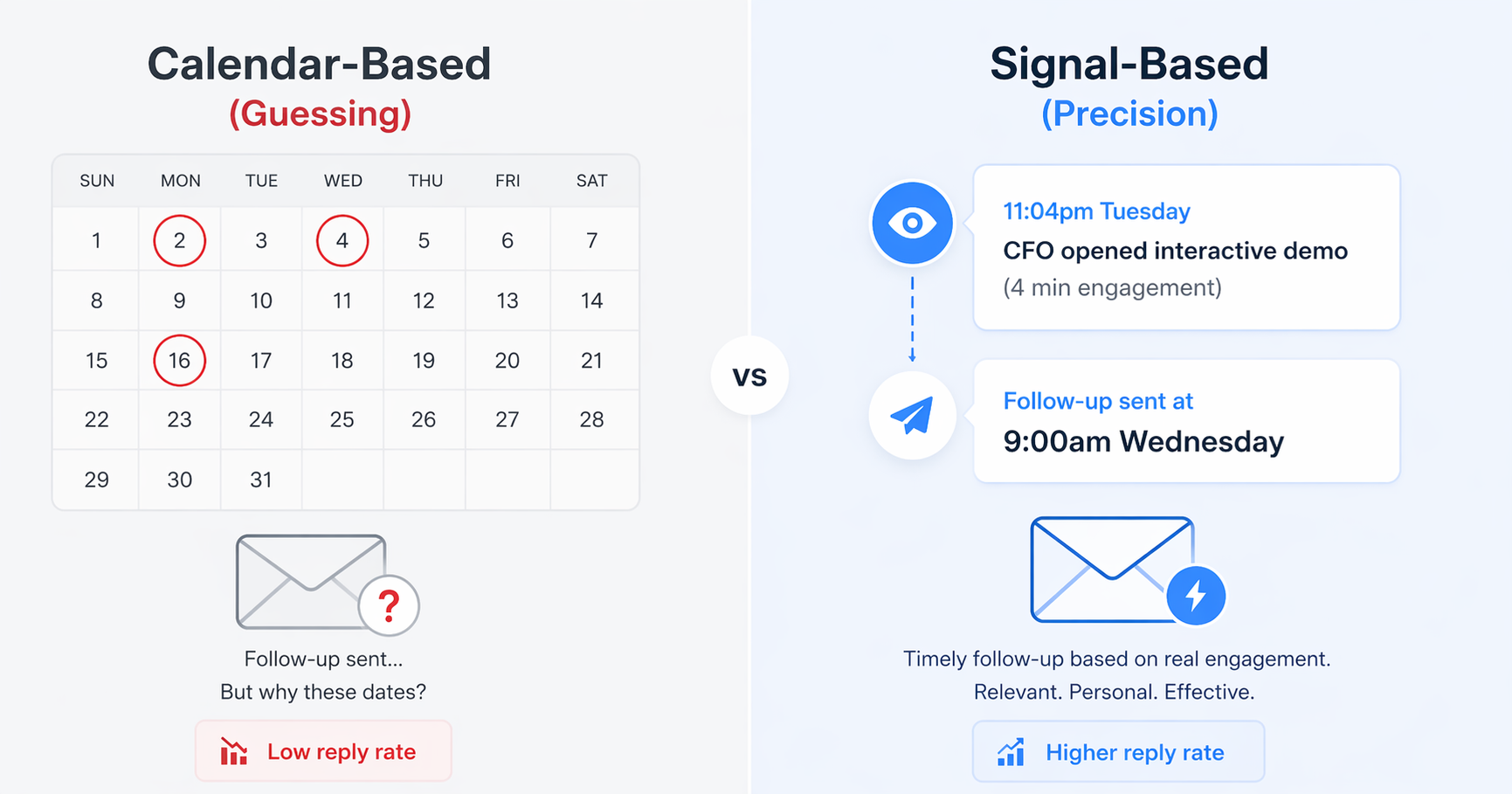
That last column — “what you learn” — is the compounding advantage. When SwiftDemos notifies you that the CFO just clicked through the ROI calculator in your interactive demo at 11pm on a Tuesday, you don’t send a check-in. You send Template #2. You have signal. That’s a fundamentally different kind of follow-up than guessing in the dark. (If you haven’t built your interactive demo yet, our guide on how to create a product demo that converts walks through the exact structure to use.)
This is why Template 6 (the Interactive Walkthrough) often performs better than all other follow-ups combined — especially for multi-stakeholder deals where you have limited visibility into internal conversations. If you want to understand why static screenshots fall short in this same context, our post on why static screenshots are killing your SaaS conversions covers the psychology in detail.
Section 04 — 3 Best Practices for Post-Demo Outreach
The templates above are only as effective as the strategy around them. Three rules determine whether your follow-up sequence moves deals forward or gets filtered into the “deal with later” folder that buyers never revisit.
1. The 2-Hour Rule (Not 24 Hours)
Most follow-up guides say “within 24 hours.” That’s too late. The right window is within 2 hours of the call ending.
Within those two hours, the buyer’s attention is still on your conversation. They haven’t moved on to three other meetings. Your email lands while the context is fresh — which means the specific details you reference feel like continuity, not a callback to something they half-remember a day later.
A fast, specific email also signals two things buyers evaluate beyond the product: you’re organized, and you’re easy to work with. Both matter when they’re deciding whether this vendor relationship will create work or reduce it.
2. Use Their Actual Language and Data
The difference between a reply and an ignore isn’t the template structure — it’s how well the bracketed text matches the buyer’s actual words.
The average B2B buying committee has 6–10 stakeholders (Gartner, 2025), each with different jobs and different objections. A single generic follow-up can’t speak to all of them. That’s why the Champion Enabler, the Technical Deep-Dive, and the CFO Executive Summary are three separate emails — each written for one specific person with one specific question.
Practical rule: if you demoed to a company using Salesforce, mention Salesforce. If they raised a compliance concern, cite it back. The more precisely your follow-up reflects what was actually said in the room, the harder it is to dismiss as a template.
3. Follow the Signal, Not the Calendar
The Day 1, Day 3, Day 7 cadence is a useful default — but the best follow-up timing is dictated by signals, not a calendar.
When SwiftDemos engagement analytics show your interactive demo link was opened at 9:30am on Thursday — especially by someone new, like a CFO who wasn’t on the original call — that’s the moment to send Template #2 or #5. Not Friday at 10am because that’s when you scheduled your next touch.
Signal-based outreach outperforms calendar-based outreach because the buyer is literally looking at your product when you reach out. The follow-up lands as relevant context, not interruption. That’s the practical difference between a 21% average B2B email open rate (Optifai, 2025) and a reply rate that moves deals to close.
FAQ — Frequently Asked Questions
How quickly should I send a follow-up email after a product demo?
Send the first follow-up within two hours of the demo while the conversation is still fresh for both parties. Research from Gong shows that winning sales reps send 8.21 follow-up emails per week compared to 1.87 for reps who lose deals. Speed matters, but the quality of what you send matters more — a personalized recap beats a generic “great chatting!” within minutes every time.
What should a demo follow-up email include?
A strong demo follow-up should include: a one-sentence recap of the specific pain point discussed, a link to the next step (mutual action plan or calendar invite), materials your champion can share internally, and a single direct question to confirm the next action. Keep it under 150 words. Brevity signals respect for the buyer’s time.
How do you follow up when a prospect goes silent after a demo?
Wait seven business days before sending a re-engagement email. Reference something specific from your original demo conversation rather than writing a generic “just checking in” note. Sopro (2025) data shows 33% of B2B prospects go quiet after initial contact, so silence is normal — not a rejection. Offer new value: a relevant case study, a product update, or an interactive walkthrough of the exact workflow they asked about.
How many follow-up emails should I send after a demo?
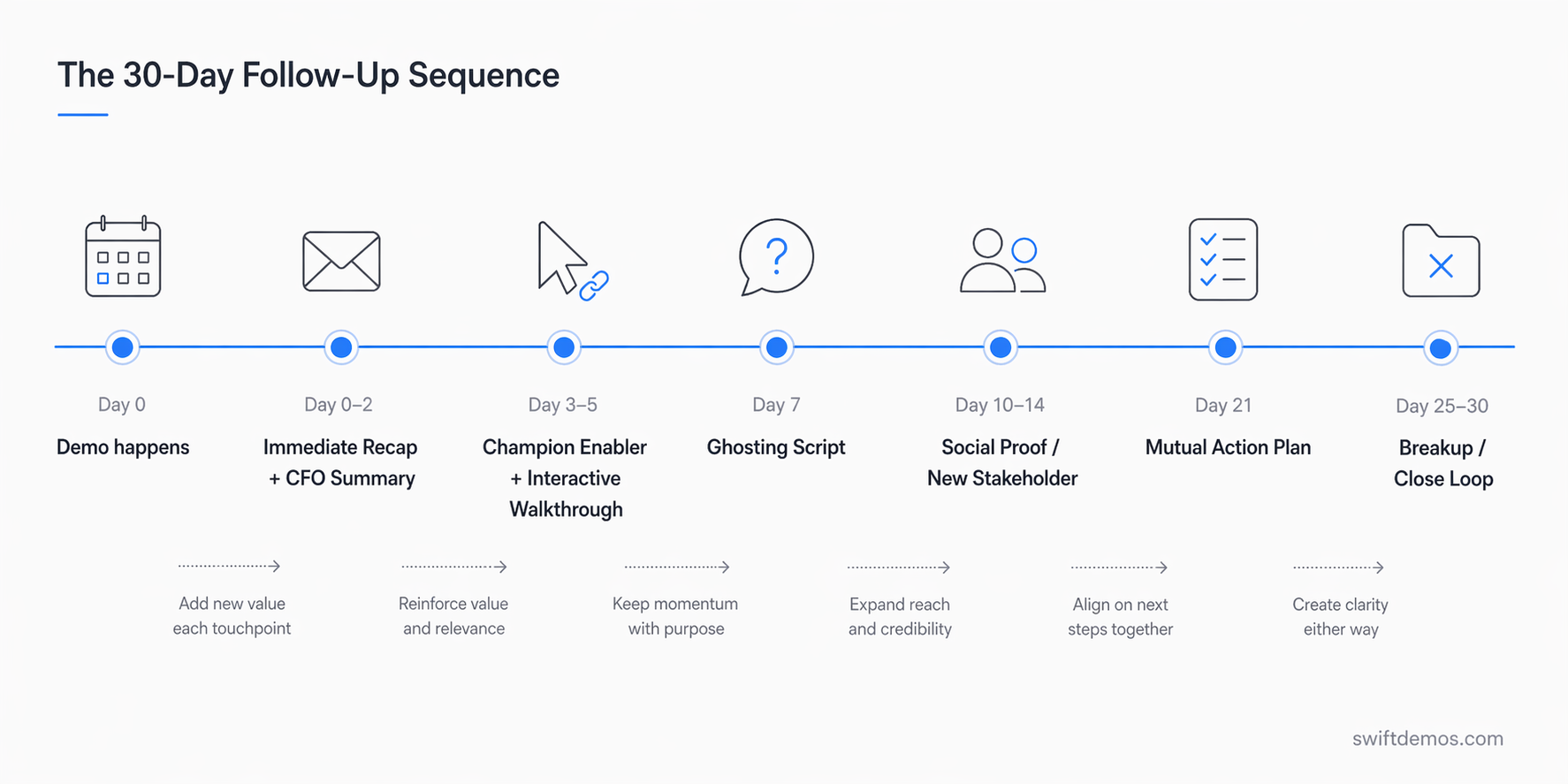
Plan for five to seven follow-up touchpoints across a 30-day window. Research from Invesp shows 80% of sales require five or more follow-ups, yet 44% of reps give up after one attempt. Space them out with new value at each touch: Day 1 recap, Day 3 value add, Day 7 check-in, Day 14 case study, Day 21 MAP update, Day 30 breakup email.
What makes an interactive demo follow-up more effective than a recording link?
An interactive demo lets your champion forward a clickable, guided walkthrough to stakeholders who missed the live call — without requiring anyone to watch a 45-minute recording. Interactive content generates twice the engagement of passive formats (Outgrow, 2025). Unlike a Zoom recording, an interactive demo delivers engagement analytics: you see exactly when the CFO or CTO clicked through it, giving you the perfect signal to follow up.
Build interactive demos that close deals.
No engineering team required. Go from Chrome capture to a shareable, trackable demo in minutes.
Start Free Trial