
Picture this. A VP of Operations at a 200-person logistics company has twenty minutes between meetings. She’s been internally pushing for a new workflow tool. She’s read the G2 reviews, compared your pricing page to two competitors’, and now she just wants to see the interface - to know in her gut whether this is worth fighting for. She clicks “See the Product.” A form appears. Name. Company. Email. Phone. Team size. “What’s your primary use case?” She closes the tab.
Your competitor had an interactive sales demo on their site. She clicked through it in eight minutes, forwarded the link to her CTO, and booked a call the next morning.
This isn’t a hypothetical. It’s what happens when you hide your product behind a gated demo — a demo request form designed around your team’s qualification process rather than your buyer’s time. The gated sales demo was built to protect pipeline quality. What it actually does is create pipeline delay. And in B2B SaaS, delay is a slow leak in every metric you care about.
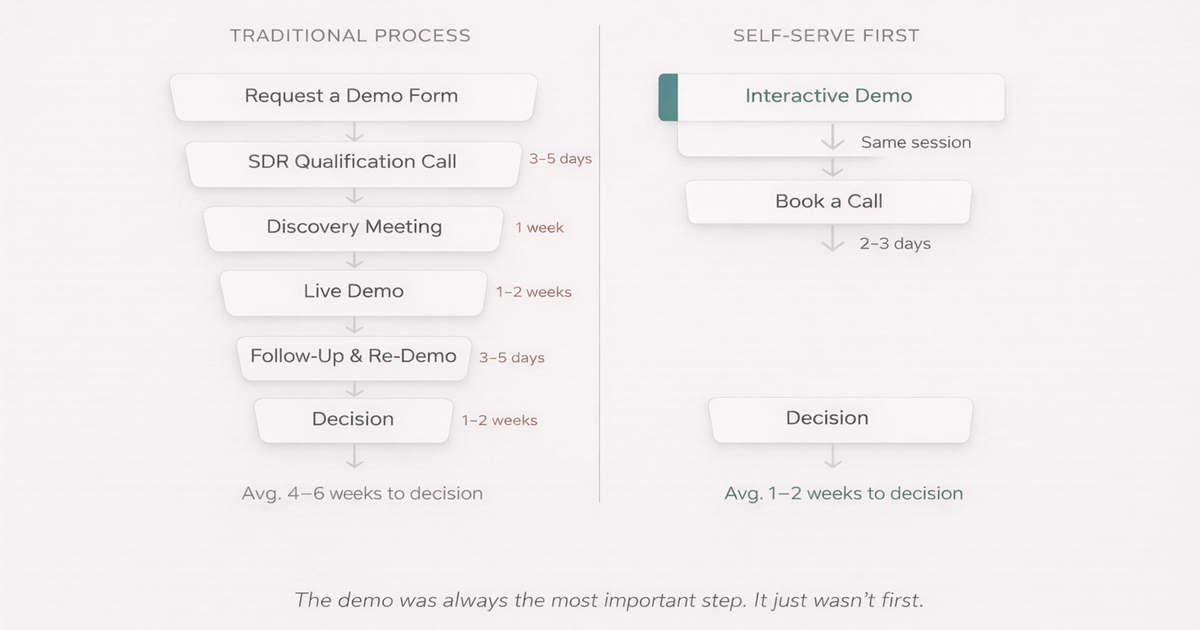
01 - The Gate Nobody Asked For
The traditional B2B sales demo process hasn’t changed much in fifteen years: prospect fills out a form, SDR qualifies them on the phone, AE delivers a live demo one to two weeks later. The product stays hidden until the buyer proves they deserve to see it.
That model made sense once - when SaaS was new, when software was genuinely hard to explain, when the seller held all the information. None of those things are true anymore.
Gartner’s 2024 B2B Buyer Report found that 75% of B2B buyers now prefer a rep-free experience - not because they dislike talking to salespeople, but because they want to form their own opinion first. Forrester puts it even more starkly: buyers complete 57% of their purchase decision before contacting a vendor at all.
So if your demo is gated behind a discovery call, you’re arriving late to a conversation that already happened — and probably happened on your competitor’s website. This is also the reason static screenshots can’t save you: they impose the same imagination burden on buyers who have already found a competitor willing to let them experience the product directly.
02 - What an Interactive Sales Demo Actually Is
Let’s be specific, because this term gets used loosely.
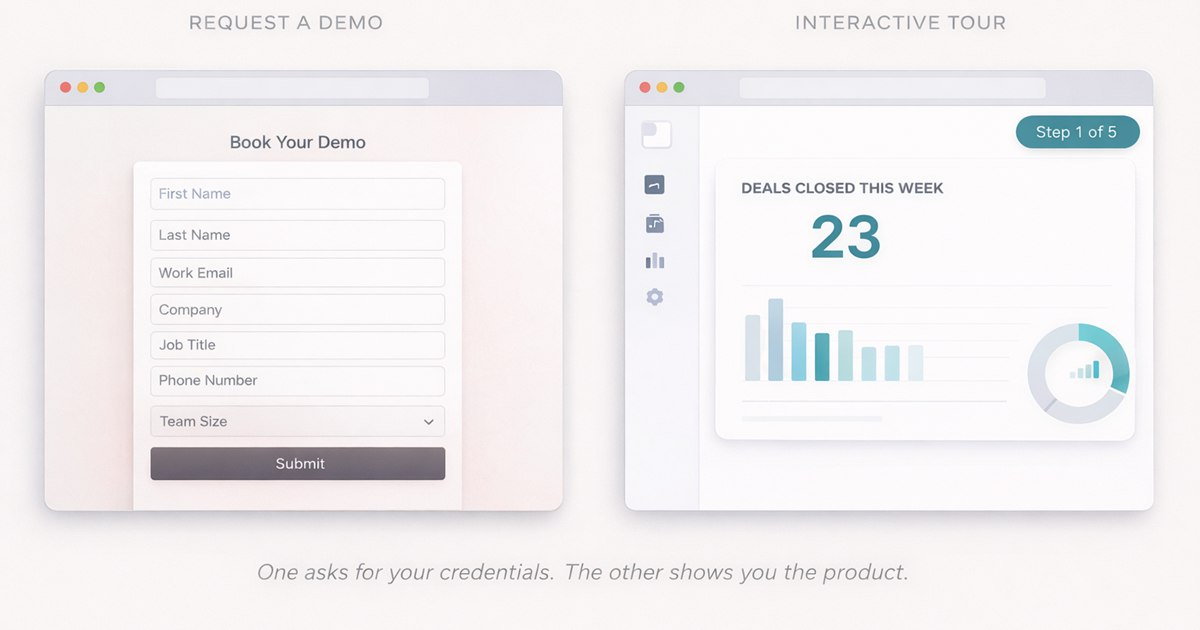
An interactive sales demo is a clickable, browser-based walkthrough of your product that a prospect can explore on their own — no login, no setup, no sales rep required. It is distinct from a gated demo (which requires scheduling a call) and from a free trial (which requires account creation and setup).
It’s not a screen recording. It’s not a slide deck dressed up with animations. It’s not a tour of your marketing website.
A well-built interactive sales demo — created with product demo software like SwiftDemos — is a clickable replica of your actual product interface, curated to walk a specific user through a specific high-value workflow. It looks and behaves like the real product because it’s built from the real product’s HTML. But it’s stable, editable, and fully tracked.
An interactive sales demo is a pre-built, clickable simulation of your software that prospects can explore without a sales representative. Unlike a gated demo behind a demo request form, it delivers product experience on demand — at the moment of peak buyer intent.
The key word is curated. An interactive sales demo isn’t product training. It’s a path to the moment your buyer thinks, “okay, I get it — this could actually work for us.” Its job isn’t to teach them the product. Its job is to make them want to learn it.
03 - The Business Case: Hard Numbers
Before we get into the how, it’s worth being honest about what’s at stake.
Speed kills deals - slowly. Chili Piper’s Speed to Lead data shows that leads contacted within five minutes of showing intent are 100× more likely to convert than those contacted thirty minutes later. Add a three-day scheduling delay to see the product, and you’re not just slowing the deal - you’re handing it to whoever responds first.
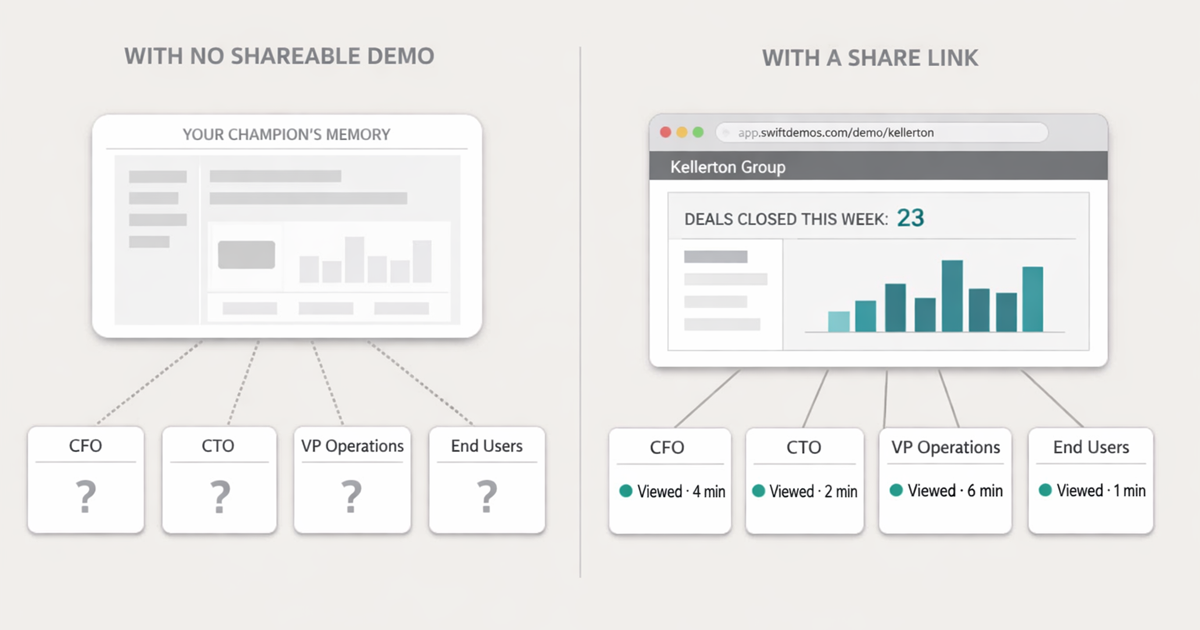
Your champion can’t do your job for you. Forrester research shows the average enterprise B2B deal involves 6 to 10 decision-makers. That means the one person who attended your live demo has to go re-explain your product to a CFO, a CTO, and a handful of end-users - from memory. If you haven’t given them something to share, you’ve asked them to sell for you with no assets. That’s how “no decision” becomes the most common outcome.
The companies growing fastest figured this out. OpenView’s 2024 SaaS Benchmarks report found that product-led companies grow 2× faster than pure sales-led companies at equivalent stages. The through line: they moved the product earlier in the funnel.
And the engagement numbers are hard to ignore. Interactive demos produce 3–5× longer dwell time on product pages than static alternatives (Content Marketing Institute). Longer dwell time means more qualified traffic, more intent signals, and more reasons for a prospect to book a call - because they’ve already decided they want one.
03.5 - Gated Demo vs Interactive Sales Demo
| Gated demo (demo request form) | Interactive sales demo | |
|---|---|---|
| Time to value | 1–2 weeks (form → SDR call → scheduling → demo) | Immediate — buyer explores on their own schedule |
| Buyer friction | High — requires committing before seeing product | None — no login, no form, no wait |
| Qualification signal | Binary — filled form or didn’t | Rich — which steps engaged, where they dropped off, share rate |
| Availability | Business hours, rep-dependent | 24/7, scales infinitely |
| Champion enablement | Buyer re-explains from memory to internal stakeholders | Buyer shares a consistent, tracked product experience |
| Sales cycle impact | Adds delay at every stage | 40% shorter on average (OpenView PLG Index) |
04 - The Control Fallacy (And Why It’s Costing You)
The most common pushback against self-serve demos is: “If we show the product before a call, we lose control of the narrative.”
It sounds reasonable. It’s wrong.
You don’t control a narrative by withholding information. You control it by delivering the right information, to the right person, at the right time, in a format they actually want. Keeping the product hidden doesn’t protect your story - it just moves the buyer’s self-discovery to somewhere you can’t influence. Usually your competitor’s tour page.
Three specific thinking patterns keep teams stuck here:
The binary trap. Teams assume they have to choose between a fully gated sales-led motion and a wide-open product-led one. That’s a false choice. The best GTM motions right now are hybrid: product-led discovery, sales-led conversion. You can show the product early and still run full enterprise deals.
The over-qualification reflex. There’s a version of qualification that protects pipeline quality. Then there’s the version that mostly protects the sales function’s sense of control. Asking a VP-level buyer to justify their intent to a junior SDR before showing them the product is the latter. And they know it.
The training manual demo. When teams do finally build a self-serve experience, they often treat it like a product walkthrough: step by step, feature by feature. Buyers don’t want a tutorial. They want to know if it’ll work for them. The question your demo needs to answer isn’t “how does this work?” - it’s “will this work for me?“
05 - The 3-Tiered Demo Strategy
The fix isn’t to eliminate your live demo. It’s to stop treating “the demo” as one thing.
Think of it as three separate deployments, each with a different job at a different stage of the buyer journey.
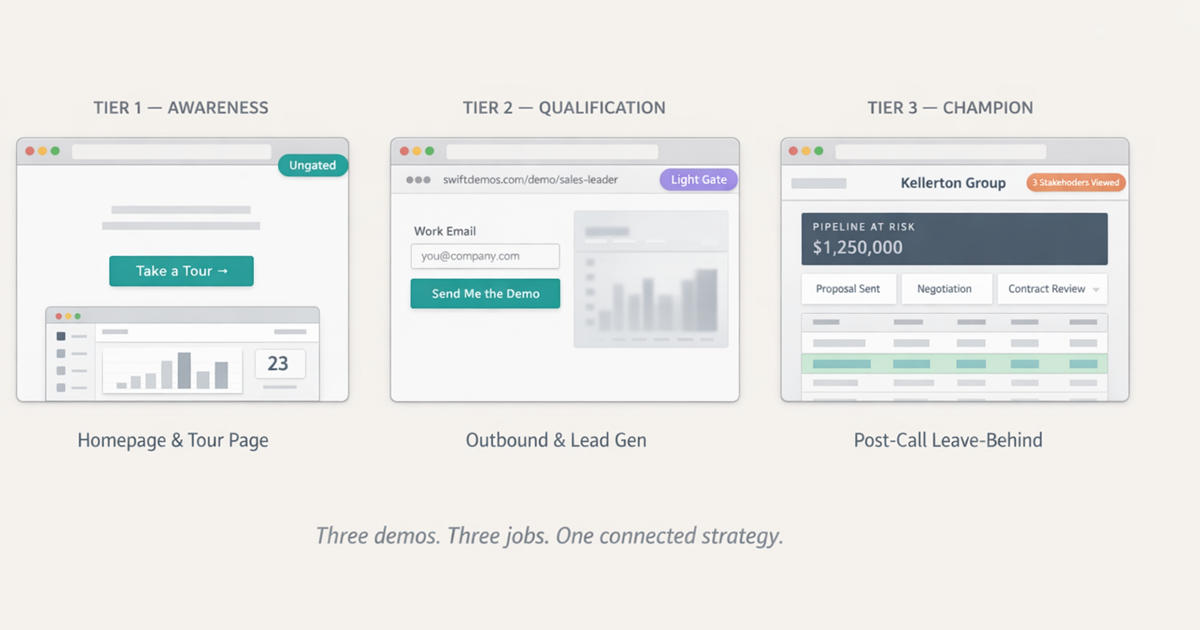
Tier 1 - The Awareness Demo
Lives on: Homepage, Pricing Page, “Take a Tour” CTA — anywhere a high-intent buyer lands. See our guide on how to structure a demo that converts for the exact 6-step template to build this tier.
Job: Answer “Is this for me?” before the prospect has to ask.
Format: An ungated, 3-to-5-step interactive tour embedded directly on the page. One workflow. One clear before-and-after.
What it is not: A feature checklist. A settings walkthrough. A tooltip tutorial.
What it is: The fastest possible path to the moment a prospect thinks, “oh - that’s actually useful.”
KPI to watch: Engagement rate, time on demo, click-through from demo to “Book a Call.”
Tier 2 - The Qualification Demo
Lives on: Outbound sequences, LinkedIn DMs, gated landing pages
Job: Replace or substantially shorten the discovery call by giving prospects depth before the meeting.
Format: A longer, role-specific path - “The Sales Leader’s View” vs. “The RevOps View,” for instance. Not every persona cares about the same features, and your demo should reflect that. This one can sit behind a light gate - an email address, not a ten-field form.
What this actually changes: When the prospect gets on a call, they already know what they want to dig into. Your AE stops giving the tour and starts having the strategic conversation. That’s a completely different - and much shorter - path to a decision.
KPI to watch: Demo completion rate, percentage of completions that book a call, show rate vs. cold outbound.
Tier 3 - The Champion Demo
Lives on: Post-call follow-up, deal rooms, shared via email
Job: Give your internal champion the tool to sell for you when you’re not in the room.
Format: A customized version of the demo that reflects the live conversation - their industry language, their specific use case, sensitive data masked, a narrative built around their buying criteria.
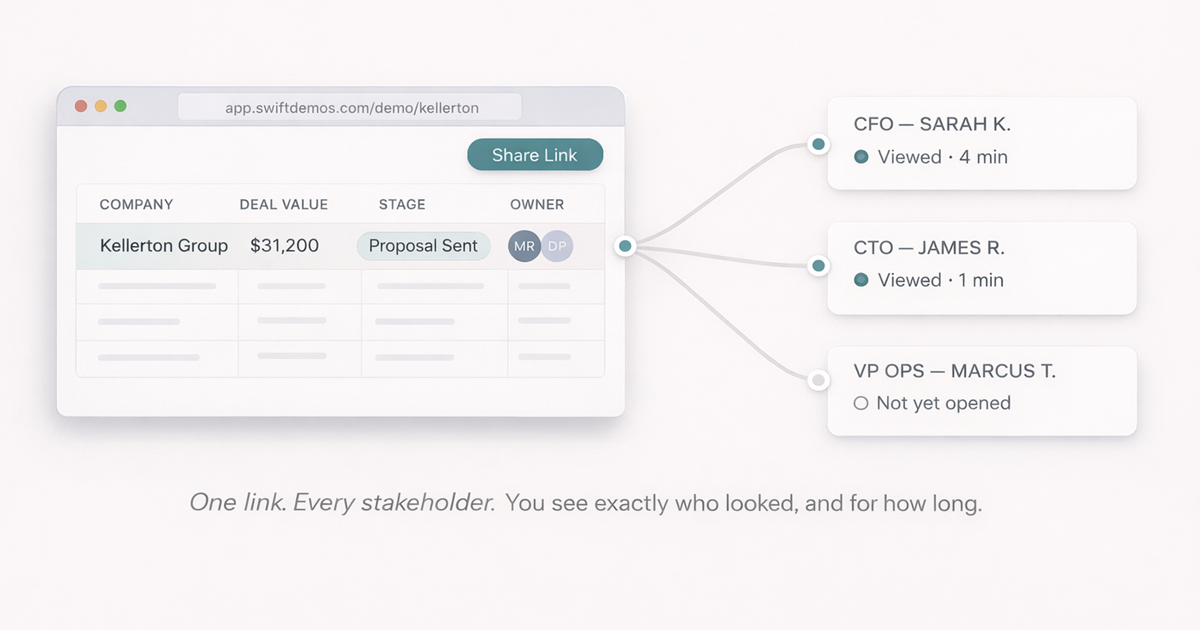
Why this one matters most: If your champion can share a link that walks the CFO through exactly the problem you solve - with your branding, their company name, and a story that matches their priorities - you’ve just extended your presence into a conversation you can’t attend.
KPI to watch: Internal share rate (how many people in the prospect’s domain opened the link), time-to-close after demo share, win rate correlation.
06 - What This Looks Like in Practice
Take a mid-market AE managing forty open opportunities. Under the old model, their week is full of demos: prep, deliver, follow up, re-run for the CTO who missed it. The product is the bottleneck. They’re a scheduling coordinator with a quota.
Under this model, it looks different.
Inbound leads arrive having already engaged with the Tier 1 demo on the website. The SDR who booked the meeting sent a Tier 2 demo in the outreach sequence - and can see that the prospect spent four minutes on the analytics module and clicked through the reporting workflow twice. The AE opens the meeting not with “let me give you an overview” but with:
That’s not a cold open. It’s a continuation of a conversation the buyer already started - with your product.
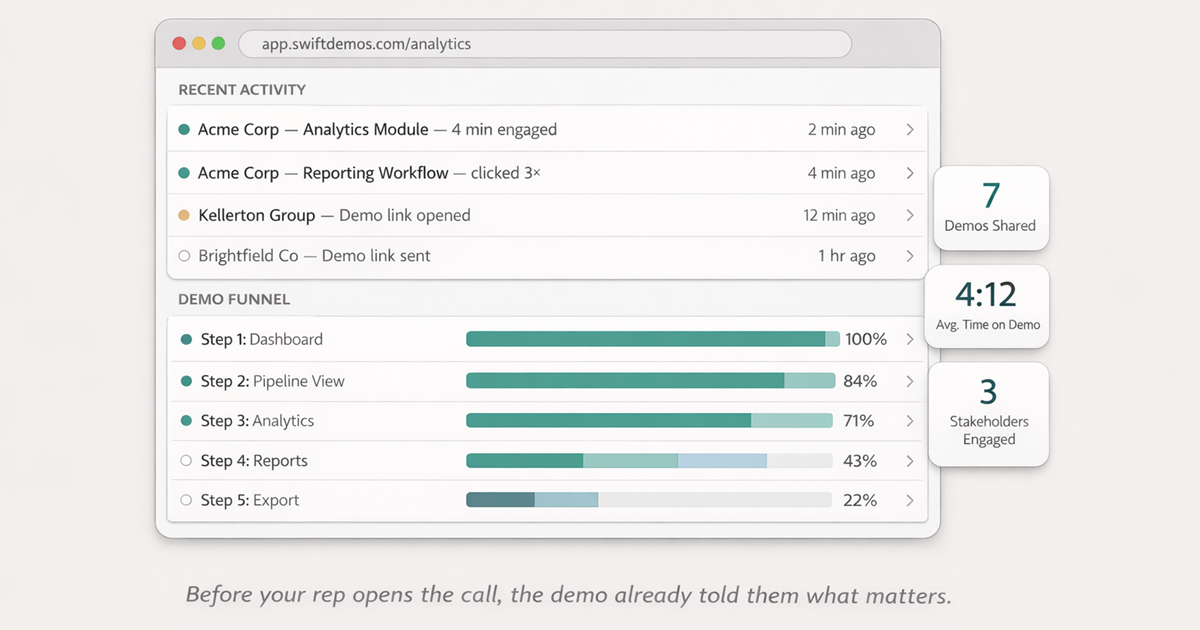
The outbound motion shifts too. Instead of SDRs sending generic follow-ups, demo engagement becomes the signal. A high-value account that viewed your demo three times in two days isn’t a cold lead. That’s a buying signal that deserves a specific, informed message - not “just checking in.”
07 - How SwiftDemos Fits the Framework
SwiftDemos exists to make this model practical for teams who don’t have a full engineering roadmap to spare.
It lets marketing and sales capture the product in its best state - no broken sandbox, no test data, no sensitive customer information - and turn it into an interactive, editable HTML demo. No code required.
For the Tier 1 Awareness Demo: Embed an interactive sales demo directly on your homepage or tour page. Because it’s HTML-based, it loads fast and is fully indexable — the value language inside your demo contributes to your SEO footprint, not just your conversion rate.
For the Tier 2 Qualification Demo: Build persona-specific interactive sales demos and share them as unique, tracked links. Before your AE jumps on a call, they can see exactly which steps the prospect completed, where they paused, and which features they returned to. Qualification intelligence — delivered passively, before the meeting even starts.
For the Tier 3 Champion Demo: Customize in minutes. Swap in the prospect’s company name, their industry terminology, the metrics that matter to their CFO. Add Hotspots that guide viewers through the specific talking points from your live call. Share a link that tracks every stakeholder in their organization who opens it.
The thing that makes all three possible without burning engineering resources: you can edit the demo without touching the codebase. Marketing updates it without filing a ticket. Sales personalizes it without a developer. Customer success builds onboarding tours without waiting on a product sprint.
07.5 - When a Gated Demo Still Makes Sense
Being objective here matters. A fully ungated, self-serve-first approach isn’t right for every product in every situation. There are contexts where keeping a demo gated — or at least partially gated — is the correct call:
- Enterprise security requirements. If your product handles sensitive data and prospects reasonably expect a private, tailored environment, an entirely public interactive demo may be inappropriate. The solution is usually a lighter public demo plus a gated, customized environment for serious evaluators — not removing the interactive demo entirely.
- Highly customized workflows. If your product’s value is entirely dependent on a custom implementation, a generic interactive demo may actively mislead. In this case, the demo request form is a legitimate step — but the interactive demo still works as a “proof of concept” experience before the custom build is shown.
- Regulated industries. Healthcare, finance, and government verticals often have compliance reasons to restrict who can access certain product interfaces, even in demo form.
In most B2B SaaS contexts, though, these exceptions apply to a small fraction of the pipeline. The default should be: give the buyer something interactive before they have to earn the right to see it. Gate the deeper, customized experience — not the first impression.
Conclusion: The Buyer Moved On
The move toward self-serve demos isn’t a trend you can afford to wait out. It’s a correction - the market finally catching up to how buyers have always wanted to purchase.
The companies winning in B2B SaaS right now aren’t the ones with the sharpest sales scripts. They’re the ones who understood, earlier than everyone else, that the product is the best sales rep on the team. And they stopped keeping it behind a form.
Put the product out front. Let the buyer explore it. Then, when they’re ready for a human, make sure that human shows up already knowing exactly what the buyer cares about.
Start with your homepage. If a high-intent prospect lands on it today and can’t see your product without scheduling a call first - you already know what to fix.
The buyer didn’t wait for you. But they’ll come back if you make it easy.
FAQ - Common Questions
What is an interactive sales demo?
An interactive sales demo is a clickable simulation of your software that prospects can explore without a sales rep — no demo request form, no scheduled call. Built with product demo software, it’s typically embedded on a website or shared via a tracked link. Unlike a video, it’s clickable. Unlike a sandbox, it needs no login and won’t break mid-session.
Does an interactive sales demo replace the live sales demo?
No — and it shouldn’t try to. Interactive sales demos handle the education and qualification work so that when you do get on a call, you’re having a strategic conversation instead of a product orientation. The live demo becomes where you close, not where you introduce.
How do you measure the ROI of a self-serve demo?
Three numbers tell the story: (1) conversion rate from demo-page visitors to booked calls, (2) average days-to-close before and after adding self-serve demos to the funnel, and (3) internal share rate - how many stakeholders in a prospect’s organization opened the link. Share rate is the strongest leading indicator that a deal has real internal momentum.
Is this only relevant for product-led growth companies?
No. Enterprise and mid-market sales-led companies often see the biggest lift, precisely because their buying cycles carry the most scheduling friction. Self-serve demos aren’t a PLG motion - they’re a buyer-education motion that works alongside any go-to-market strategy.
What makes a self-serve demo work better than a product tour video?
Three things: interactivity (the buyer drives), curation (it shows outcomes, not a feature inventory), and trackability (you know what they actually cared about). A passive video fails on all three. A well-built interactive demo turns into a qualification conversation before your rep ever picks up the phone.
Can you gate a self-serve demo for lead generation?
Yes - but gate it after you’ve given something worth gating. A light ask (email address, not a ten-field form) in exchange for a deeper, persona-specific demo is a fair trade. Gating before the prospect has seen any value is the same mistake as the “Request a Demo” form you’re trying to replace.
Sources: Gartner (2024) The Future of Sales: B2B Buying Preferences Report. Forrester Research: The New B2B Buying Journey. Chili Piper: Speed to Lead Conversion Benchmarks. OpenView Partners: 2024 SaaS Benchmarks Report. Content Marketing Institute: Interactive Content Engagement Study.
Build interactive demos that close deals.
No engineering team required. Go from Chrome capture to a shareable, trackable demo in minutes.