
A $25,000 ACV deal. The demo went well — real well. The champion was leaning forward, taking notes, asking good questions about the reporting module. You wrapped up with strong buying signals and a verbal “we’ll move quickly on this.” You sent the recording and the deck that afternoon. Then silence. A week passes. Then two. You send a check-in. Nothing. Three weeks later, you get a one-line email: “We’ve decided to go in a different direction.”
The demo didn’t lose that deal. What happened next did.
Here’s what actually went wrong: your champion walked into a budget meeting two days after the call and tried to explain your product from memory — to a CFO who had never seen it, a CTO who had questions about integration, and three end users who were skeptical. They had a 45-minute recording nobody would watch and a 30-slide deck with no context. They were selling blind. The deal died not in your demo — it died in an internal meeting you weren’t in, to stakeholders you’d never spoken to, and your champion wasn’t equipped to win it.
That’s the real reason deals stall after a great demo. And it’s why a different approach — one we call the Demo-to-Close Framework — focuses less on following up with your buyer and more on enabling your champion.
Quick answer - What Should You Send After a Sales Demo?
The best follow-up after a sales demo is not a generic recap or a recording link. It is a short, personalized package your champion can forward internally without having to re-explain the product.
- A same-day recap. Confirm the pain, desired outcome, buying process, and next step while the conversation is still fresh.
- One personalized workflow. Send an interactive product demo that focuses on the one workflow tied to the buyer’s priority.
- Context for absent stakeholders. Write the follow-up so the CFO, CTO, or VP who missed the demo can understand why it matters in under three minutes.
- One clear next step. Offer a specific assist: champion prep, pricing review, technical validation, or stakeholder walkthrough.
- Engagement tracking. Follow up when the asset is opened, shared, or revisited - not just when your sequence says it is time to check in. SwiftDemos includes this in its demo engagement analytics workflow.
If your follow-up cannot survive being forwarded without your explanation, it is not follow-up. It is homework for your buyer.
01 - Why Deals Stall After a Demo (And Why Your Follow-Up Isn’t Working)
Gartner describes the typical buying group for a complex B2B solution as six to 10 decision makers, each bringing independently gathered information into the process. Most of them never attend the sales demo. They show up later - in procurement reviews, executive briefings, technical validation calls - and they arrive knowing only what your champion told them, which is a degraded version of what you showed them, filtered through memory and competing priorities.
This is the fundamental problem with the standard post-demo follow-up: it’s designed to communicate with the person you already have, not the people you don’t.
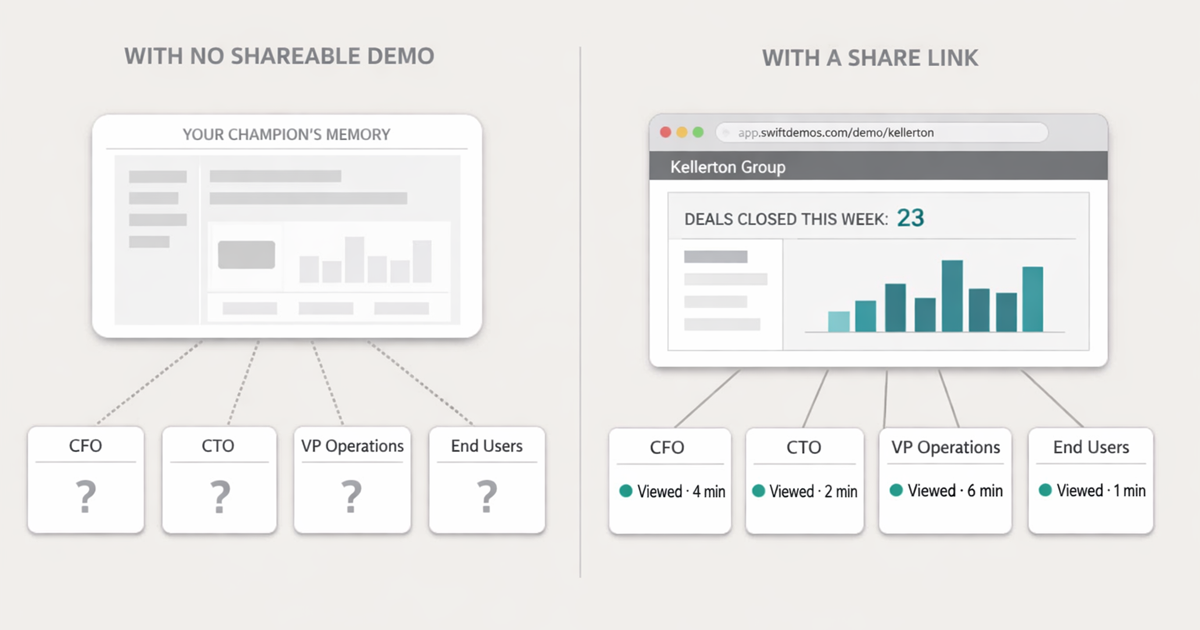
Think about what you typically send in a post-demo follow-up:
- The Zoom recording. Forty-five minutes long. Nobody will watch it. Even your champion won’t re-watch it. The CFO definitely won’t. It’s technically “helpful” and practically useless.
- The slide deck. No context, no voiceover, no interactivity. A 30-slide PDF that made sense during a live presentation becomes a confusing wall of screenshots when experienced alone. This is the same format problem behind why screenshots hurt conversions: static visuals make the buyer do the interpretation work.
- The sandbox. “Here’s a trial environment you can poke around in.” Sandboxes require setup, contain no relevant data, and are overwhelming to anyone who hasn’t been through a demo. End users don’t know where to start. Executives won’t bother.
Each of these formats has the same structural problem: they put the burden on the buyer. Your champion has to find time to re-watch the recording, re-read the deck, and somehow translate both into a compelling internal argument. You’ve handed them raw materials and called it enablement.
The insight that changes everything: the goal of post-demo follow-up isn’t to remind your prospect you exist. It’s to give your internal champion a tool that sells for you — in meetings you’ll never attend, to stakeholders you’ve never spoken to, at a moment when the deal is either going forward or going quiet.
02 - Post-Demo Follow-Up Timeline
Use time-based follow-up for the first 24 hours, then switch to signal-based follow-up once the asset is live.
| When | What to send | Why it matters |
|---|---|---|
| 0-2 hours | Internal notes, pain summary, stakeholder map, next-step owner | Locks in what you learned before memory gets fuzzy |
| Same day | Short recap email with agreed priorities and next step | Shows control of the process without overwhelming the buyer |
| Within 24 hours | Personalized interactive demo of one core workflow, built with a shareable demo link | Gives the champion something concrete to forward internally |
| 2-3 days later | Signal-based follow-up if the demo was opened, shared, or replayed | Turns outreach from a check-in into a timely assist |
| Before internal meeting | Champion prep note: value summary, likely objections, recommended next step, plus a product demo example they can reference | Helps your buyer sell the decision when you are not in the room |
03 - The Demo-to-Close Framework (A 3-Step System)
The Demo-to-Close Framework is built around one idea: your follow-up should be something your champion can share internally without needing to explain it. It should work on its own — clearly, quickly, and compellingly — even when you’re not in the room.
Three steps get you there.
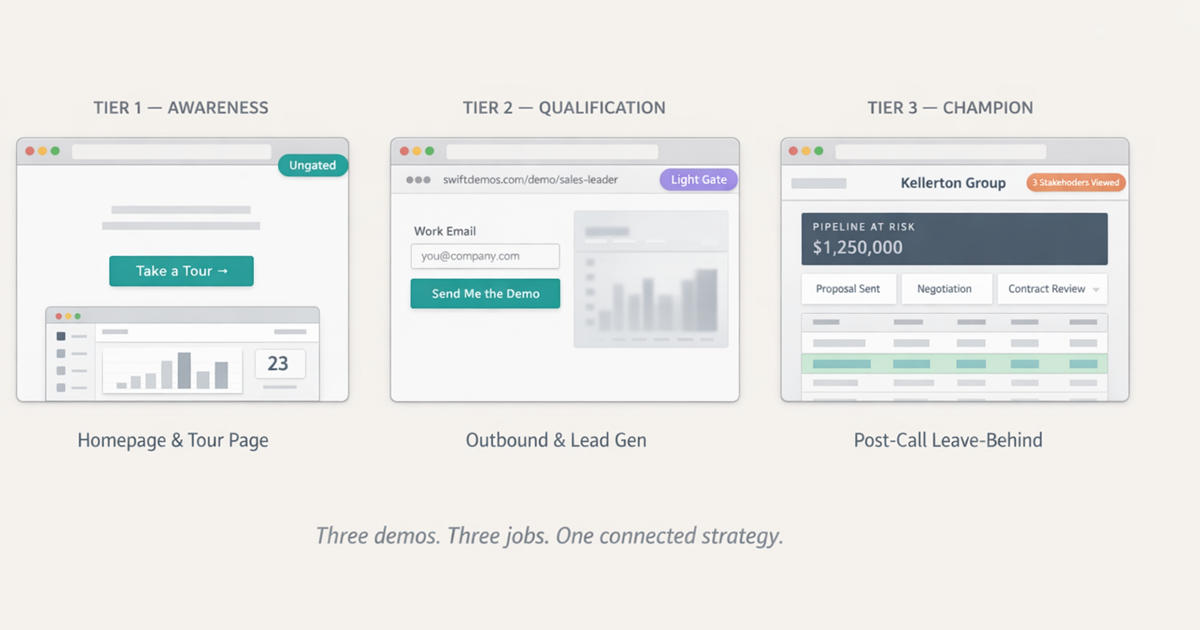
Step 1 — Curate One Workflow (Not Your Whole Product)
The most common mistake in post-demo follow-up is sending too much. You want to be thorough. You want to show the depth of the product. So you send a demo environment that covers everything, or a recording of the entire call. That is usually a sequencing problem, not a product problem - the same issue covered in our guide on how to build a product demo that converts.
Don’t. Pick one workflow. One clear, end-to-end path through your product that solves the exact problem your champion cares about. If you need help structuring that workflow, use these product demo best practices before you build the follow-up asset.
If you’re selling a CRM, that might be a five-step flow: lead comes in → gets assigned to a rep → moves through the pipeline → triggers a forecast update → surfaces in the weekly report. That’s a complete story. It has a beginning, a middle, and an ending that connects to something the CFO cares about (forecast accuracy). It takes three minutes to walk through. And it’s specific enough that every stakeholder can locate themselves in it.
Clarity beats completeness every time. A follow-up that shows one thing well gives your champion something to talk about. A follow-up that shows everything gives them nothing to focus on — and nothing to say.
The instinct to show more comes from insecurity about the product, anxiety about missing a stakeholder’s use case, or both. Resist it. If you’ve done a good discovery call, you know which workflow triggered the strongest signal. That’s your one workflow. Start there.
Step 2 — Personalize for the Executive Who Wasn’t There
Your champion attended the demo. The CFO, the CTO, the VP of Operations — they didn’t. And they’re the ones who will ultimately approve or kill this deal.
So here’s a useful mindset shift: don’t build your follow-up for your champion. Build it for the executive your champion is going to show it to.
That means:
- Swap in their company name. Not “Acme Corp” placeholder data — their actual company name.
- Use their industry language. A healthcare company shouldn’t see retail terminology. A logistics company doesn’t want marketing workflow examples.
- Show data that resembles their reality. Revenue ranges, team sizes, workflow structures that match what they actually manage. If the product story needs broader context, pair it with an interactive product experience earlier in the buyer journey.
- Frame the value in terms the executive cares about — time saved, revenue impacted, risk reduced — not feature checklists.
When the CFO opens a demo that says their company name, shows their kind of data, and answers the question they would actually have — it doesn’t feel like a vendor sales asset. It feels like a solution preview. That psychological difference is substantial. It also makes your champion look smart for sending it.
Step 3 — Use Engagement Signals to Time Your Follow-Up
The single worst follow-up message in B2B sales is “just checking in.” It communicates nothing, asks for nothing, and forces the prospect to do all the work of figuring out why you reached out. It gets ignored — because it deserves to be.
The alternative is signal-driven outreach. Instead of following up on a calendar schedule, follow up when something happens: when your demo gets opened, when it gets shared with someone new in the organization, when a specific step gets replayed three times. The underlying capability is simple: track demo engagement and use that behavior to decide what help the buyer needs next.
That creates a completely different kind of message:
“Hey — saw your team took another look at the reporting module this morning. Sounds like that came up internally. Want me to put together a short call to help you prep for that conversation?”
That message does three things at once: it shows you’re paying attention, it signals that you have information they don’t, and it offers concrete help at a moment when they actually need it. It’s not follow-up. It’s a precisely timed assist.
04 - Post-Demo Follow-Up Email Templates
Use these as starting points. The structure matters more than the exact wording: recap the buyer’s problem, send one useful asset, and make the next step specific.
Template 1: Same-Day Recap After a Strong Demo
Subject: Recap from today + next step
Hi [Name],

Thanks again for walking through [workflow/problem] today.

The three priorities I heard were:
1. [Priority one]
2. [Priority two]
3. [Priority three]

Based on that, the most relevant next step is [specific next step].

I will send over a short, tailored walkthrough of the [specific workflow] so you can share it with [stakeholder/team] before your internal discussion.

Best,
[Your name]
Template 2: Follow-Up With a Personalized Demo Link
Subject: A short walkthrough for [Company]’s [workflow]
Hi [Name],

I put together a short walkthrough focused only on the [specific workflow] we discussed:

[Personalized demo link]

It is built for the internal conversation with [stakeholder/team]. The main thing to notice is how [specific outcome] happens without [current pain/manual step].

If useful, I can also help you turn this into a short internal summary before your [meeting/review].

Best,
[Your name]
Template 3: Signal-Based Follow-Up After Internal Sharing
Subject: Want help prepping the [stakeholder] conversation?
Hi [Name],

Saw the [workflow/demo section] got another look today.

That usually means the internal conversation is moving from "is this interesting?" to "does this fit our process?"

Want me to put together a short prep note for [stakeholder/team] covering:
- the value case
- likely questions
- the cleanest next step

Best,
[Your name]
05 - Example: CRM Demo Follow-Up
Here is how the framework looks in a real SaaS sales motion.
| Element | Example |
|---|---|
| Product category | CRM platform |
| Champion | VP of Sales |
| Absent executive | CFO |
| Core workflow | Lead comes in, gets assigned, moves through pipeline, updates forecast, appears in weekly revenue report |
| Value angle | Forecast accuracy and reduced manual reporting |
| Follow-up asset | Three-minute interactive demo showing the forecast workflow with the prospect’s team structure and pipeline stages |
| Signal to watch | CFO opens the reporting step twice or shares it with finance operations |
| Next message | “Looks like the reporting workflow is getting attention. Want help mapping this to the forecast review process before your finance meeting?” |
This is the difference between following up with a file and following up with a buying process. The asset is not just a reminder. It is a tool your champion can use to move the decision forward. If you want to see the product mechanics behind this, the SwiftDemos product demo shows how a captured walkthrough becomes a guided, shareable experience.
06 - Bad vs. Good Post-Demo Follow-Up
The best way to diagnose weak follow-up is to compare what the message asks the buyer to do.
| Weak follow-up | Strong follow-up |
|---|---|
| “Just checking in to see if you had any thoughts.” | “Saw your team reviewed the reporting workflow again this morning. Want help prepping the finance conversation?” |
| “Here is the recording from our call.” | “Here is a three-minute walkthrough of the exact workflow your VP Ops asked about.” |
| “Let me know if anyone else needs information.” | “I can send a CFO version focused on forecast accuracy and a CTO version focused on integration scope.” |
| “Attached is our deck.” | “This link walks through the value story in the order your internal team needs to evaluate it.” |
07 - Passive vs. Interactive Follow-Ups
Not all follow-up formats are created equal. The difference between a Zoom recording and an interactive demo isn’t just aesthetics — it’s friction, context, and what happens when that asset lands in front of someone who has never spoken to your sales team.
| Format | Friction | Context | Analytics | Shareability |
|---|---|---|---|---|
| PDF Deck | High — requires download, context | Low — static slides with no narrative | None | Low — no engagement signal on share |
| Zoom Recording | Very High — 45+ min commitment | Medium — live context, but buried | None | Low — nobody forwards a recording |
| Sandbox / Trial | Medium — requires login, setup | High but overwhelming — no guided path | Limited | Medium — hard to share a meaningful state |
| Interactive Demo | Low — opens in browser, no login | High — guided, curated, on-point | Full — opens, shares, step completions | High — a link that tells your story |
The pattern is consistent: the easier it is to understand your product, the faster deals move. This isn’t a product quality problem. It’s a format problem. A VP who spends three minutes in a well-built interactive demo understands more than someone who watched twenty minutes of a recording — because the interactive experience forces active engagement, not passive consumption. For the broader format comparison, see screenshots vs interactive demos.
There’s also a shareability dynamic that matters a lot in enterprise deals. A recording link doesn’t travel. Your champion might forward it, but nobody is going to pass a 45-minute Zoom link to their CFO and expect them to watch it before a budget meeting. An interactive demo — especially one that runs in under three minutes, looks like their product, and is already personalized — gets shared. If static assets are your primary follow-up, the same friction behind why gated demos lose deals shows up again after the call: the buyer has to work too hard to understand value.
When a CFO opens a demo link your champion forwarded, that’s not just engagement data. That’s a signal that the deal has real internal momentum — and you can follow up on it in real time.
08 - Why Interactive Demos Win Post-Call
There are four specific reasons interactive demos outperform passive follow-up formats in post-demo situations — and they compound on each other.
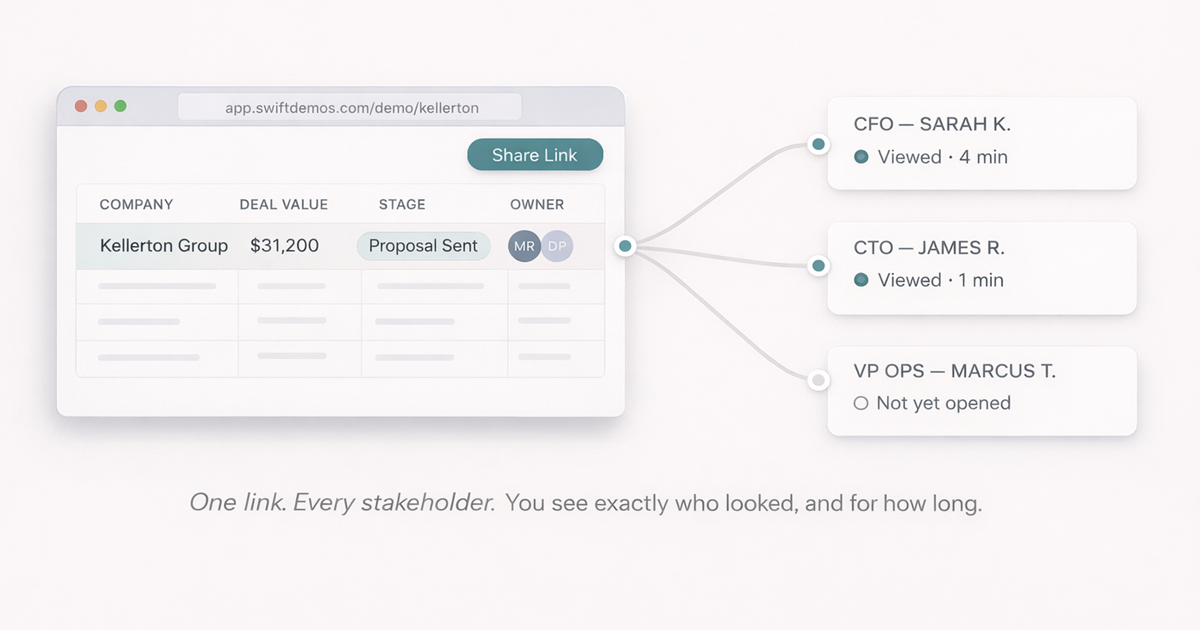
They tell the product story without your champion having to. When your champion shares an interactive demo, it guides the viewer through exactly the narrative you want — step by step, with the right context, in the right order. They don’t have to remember how you positioned the analytics module. They don’t have to field a question about integrations without backup. The demo answers those questions. Your champion becomes a facilitator, not a re-seller.
They reduce cognitive load for executives. Senior buyers aren’t going to spend time in a sandbox. They’re not going to sit through a recording. But they will click through a guided three-minute demo if it looks relevant to their problem and lands cleanly in their inbox. The interactive demo meets them at their level of available attention — and it works whether they’re at their desk or reviewing it on a phone between meetings.
They increase internal sharing. A well-built interactive demo is easy to forward precisely because it’s self-contained. It doesn’t require context. It doesn’t need a cover email to explain what it is. Your champion sends a link; their colleague clicks it; the story tells itself. The more stakeholders who experience your product before the final decision meeting, the better your odds. This is where a self-serve interactive demo becomes more than a marketing asset: it becomes deal infrastructure.
They give you visibility into deal activity. When someone opens your demo, you know. When they share it internally and a new stakeholder reviews it, you know that too. Deals that look quiet from the outside sometimes have active internal evaluation happening — evaluation you can now see, act on, and time your outreach around. That’s not a marginal improvement. It replaces guesswork with signal. The same workflow is part of the core SwiftDemos features set.
09 - When Interactive Demos Aren’t Enough
Being honest here matters: an interactive demo isn’t the last thing you send in a deal. There are moments in the buying process where the bottleneck is something different entirely, and sending another demo link won’t move it.
Three specific situations:
Pricing proposal → decision. Once the prospect has seen the product and understands the value, they need a number. The interactive demo did its job. Now you need a clear, customized proposal that maps pricing to the specific value drivers they care about — ideally with an ROI estimate tied to numbers from their own world. For buyers comparing plan fit, point them to SwiftDemos pricing after the value story is clear.
Security docs → approval. Enterprise deals almost always include a security review, and that review requires documentation — SOC 2 reports, data processing agreements, answers to security questionnaires. No demo accelerates this. The right asset here is a pre-populated security profile and a fast path to a security call if questions come up.
API docs → technical validation. If a developer or solutions architect is evaluating integration complexity, they need technical documentation, not a sales demo. Send them the integration guides, the API reference, and an offer to connect them with your solutions engineering team.
Think of these as sequential rather than competing: the interactive demo moves the deal from curiosity to commitment. Then targeted enablement — the right document for the right stakeholder at the right moment — handles the final mile.
10 - The Post-Demo Checklist
Before you send that follow-up, run through this. It’s short. Five items. But in our experience, most post-demo follow-ups fail at least two of them — and that’s usually why deals go quiet.
One core workflow only
Not a full product tour. Not everything you covered in the call. The single workflow that maps to their stated top priority. If you’re unsure which one, it’s the moment in the demo when they started asking follow-up questions unprompted.
Personalized to the prospect
Company name, relevant data, industry language. If the demo could be sent to any company in your pipeline, it’s not personalized enough. It should feel like it was built for this account specifically — because it should be.
Clear in under three minutes
If an executive who has never heard of your product can’t get the core value proposition in three minutes, it’s too long. Cut it. The goal is comprehension, not comprehensiveness. If they want more, that’s what the next call is for.
Strong next step included
Not “let me know if you have questions.” A specific offer: a call to help them prep for the internal stakeholder conversation, a 20-minute session to walk through the pricing model, a technical review with your solutions architect. Make the next step concrete and low-commitment.
Engagement tracking enabled
You need to know when the demo is opened, replayed, and shared. Without this, you’re flying blind. With it, your follow-up shifts from calendar-based to signal-based — and that’s a fundamentally different, more effective motion.
Conclusion: The Handoff Problem
Deals close when buying committees understand what they’re approving. Not when they’ve been emailed enough. Not when they’ve had three follow-up calls. When the people responsible for the decision — the CFO, the CTO, the operational lead — can look at something concrete and say: “Yes, I understand what this does, and I believe it solves the problem we have.”
If your post-demo follow-up can’t survive an internal meeting you weren’t invited to — if it relies on your champion’s memory, their presentation skills, or a recording nobody will watch — you don’t have a follow-up strategy. You have a hope strategy.
The Demo-to-Close Framework fixes the handoff. One workflow, personalized for the executive who wasn’t in the room, trackable so you know when to reach out. That’s not a complicated idea. It’s just rarely executed well — because most teams are still treating the follow-up as a formality rather than the most important part of the deal.
The deal almost never closes in the room with you. Make sure something of yours is in the room when it does.
If your deals are stalling after the demo, it’s not a pipeline problem — it’s a handoff problem. SwiftDemos is built to fix that.
FAQ - Common Questions
What is the best way to follow up after a sales demo?
The best post-demo follow-up sends one curated, interactive workflow — not a recording or a PDF deck. It should be personalized to the prospect company, take under three minutes to review, and include engagement tracking so you know when to reach out. Timing your follow-up to when the demo is actually opened converts “checking in” into a signal-driven touchpoint.
How quickly should you follow up after a demo?
Within 24 hours — but the more important question is what you send. A generic recording in 20 minutes is worth less than a personalized, curated interactive demo sent the next morning. Speed matters less than quality. That said, once you have a strong follow-up process in place, same-day delivery is achievable and builds positive momentum.
Why do deals stall after a sales demo?
Deals stall because your champion has to re-sell your product internally — to executives and end users who never attended. If you didn’t give them something concrete and easy to share, they’re selling from memory. Most internal champions aren’t professional salespeople. They need a tool, not a recording link and a prayer.
What should a post-demo follow-up email include?
Your follow-up should include: (1) a link to a personalized interactive demo of one specific workflow, (2) brief context on why that workflow matters to their situation, and (3) a clear next step. Avoid attaching slide decks or Zoom recordings. They add friction without adding clarity. The goal is to make the internal conversation easier — not just to remind them you exist.
What is champion enablement in B2B sales?
Champion enablement means equipping your internal advocate — the person who attended your demo — with everything they need to sell on your behalf. That includes shareable demos, competitive talking points, ROI frameworks, and objection-handling materials. Your champion is fighting for your deal in meetings you’ll never be invited to. Give them something worth fighting with.
Sources: Gartner, “The New B2B Buying Journey,” for buying group complexity, supplier time, and buyer difficulty benchmarks; Forrester, “The State of Business Buying, 2024,” for buying process stall and buyer dissatisfaction context. Individual demo performance varies by product category, market, sales process, and implementation quality.
Build interactive demos that close deals.
No engineering team required. Go from Chrome capture to a shareable, trackable demo in minutes.
Start Free Trial