
The VP of marketing opens the demo analytics report for the third time that week. Three separate internal conversations, one underlying question: should the homepage have a video, a guided tour, or a clickable interactive demo? Four team members with four different mental models. Two vendors each claiming their format converts best. Nobody has agreed on what “converts” even means in this context. They’re about to spend a quarter of budget debating a question they haven’t yet framed correctly — because video demos, guided product tours, and clickable interactive demos are not interchangeable. They solve different problems for different people at different moments in the funnel.
The best interactive product demo examples are not generic product walkthroughs. They’re short, focused workflows built to help a specific buyer answer a specific question — before they talk to sales, book a call, or sign up for a trial.
Three demo formats dominate SaaS marketing in 2026: the video demo, the guided product tour, and the clickable interactive demo. They look similar from the outside. They solve completely different conversion jobs. This guide covers nine real interactive product demo examples — grouped by format and use case — plus the benchmark data that shows when each one converts. For the deeper conceptual comparison, start with Interactive Product Tours vs Demos. This post picks up where that one leaves off.
01 - Quick Answer: Which Demo Format Converts Best?
In Storylane / Factors.ai benchmark data, website visitors who engaged with a clickable interactive demo converted at 24.35% versus a 3.05% overall website baseline (Storylane / Factors.ai, 2024, n=110,257 sessions). That does not mean every team should immediately replace their video and tour with a clickable demo. It means the format being used has to match the audience’s intent and funnel position.
Here’s the core orientation before the format-by-format breakdown:
| Format | Primary job | Audience | Where it lives |
|---|---|---|---|
| Video demo | Awareness, initial storytelling | Cold prospects, top-of-funnel browsers | YouTube, homepage, social, email nurture |
| Guided product tour | Onboarding, feature activation | New users post-signup | Inside the live product |
| Clickable interactive demo | Pre-sales evaluation, lead qualification | Prospects before signup or a sales call | Homepage, feature pages, outbound, leave-behinds |
The most common mistake isn’t choosing the wrong format — it’s using all three interchangeably. Each format was built for a different audience at a different decision moment.
02 - Video Demo vs Guided Tour vs Clickable Demo: Which Converts Better?
In vendor benchmark data, clickable interactive demos have shown materially higher engagement and CTA rates than passive video walkthroughs — especially when the buyer is already evaluating a product. Arcade reports 7.2× higher click-through than product marketing videos, while Storylane / Factors.ai reported a 24.35% conversion rate for visitors who engaged with an interactive demo versus a 3.05% overall website baseline (Arcade, 2025; Storylane / Factors.ai, 2024). Treat those as directional benchmarks, not universal guarantees.
Here’s how the benchmark data reads across the three formats:
| Format | Key benchmark | What it measures |
|---|---|---|
| Video demo | Highest play rates on homepage and product pages; viewers watch about halfway (Wistia, 2026) | Views, play rate — awareness stage signal |
| Guided product tour | 80% more activation steps completed with interactive onboarding vs none (Arcade, 2025) | Feature activation, week-1 retention |
| Clickable interactive demo | 55% engagement, 43% completion, 29% CTA CTR (Navattic, 2026); 24.35% website conversion vs 3.05% baseline (Storylane, 2024) | Demo engagement + pipeline conversion |
The comparison isn’t actually “which format is better.” It’s “which format is better at which job.” Product tours don’t compete with clickable demos on website conversion because tours don’t live on the website — they live inside the product, measuring activation rather than acquisition. Video demos don’t compete with interactive demos on evaluation-stage conversion because passive watching and active clicking serve different cognitive modes.
The most honest framing: interactive demos are usually the strongest evaluation-stage example. Video wins the awareness stage on distribution (YouTube indexing, social sharing, email click rate). Tours win the activation stage for PLG funnels. The common mistake is treating these as competing choices rather than sequential stages in the same funnel. For the strategic case on deploying all three in order, the full breakdown is in our product tour vs interactive demo comparison.
One more data point worth noting: interactive demos can also compress sales cycles. In the same Storylane / Factors.ai study, prospects who engaged with a clickable demo before a discovery call were associated with an average sales cycle reduction from 33 to 27 days — an 18% reduction (Storylane / Factors.ai, 2024). The rep’s first conversation starts later in the evaluation — which means it starts closer to a decision.
03 - 9 SaaS Demo Examples That Convert
This page is about examples. The comparison data above only matters because it helps you choose the right example for the buyer moment. The nine examples below are grouped by format first, then by use case, so the list does not mix a video format with a homepage placement as if they were the same thing.
Example 1: Video Demo for Quick Product Storytelling
What it looks like: A two-to-four minute screen-recorded walkthrough that shows one core workflow from start to finish. A CRM video demo might open on the pipeline view, move through adding a deal, and end on a close-rate report. The viewer watches; they do not interact.
Use this when: the buyer is still browsing and needs a quick answer to “what does this product do?” Wistia’s 2026 State of Video Report analyzed 13 million videos and 79 million hours of viewing data, and found that homepage, video gallery, and product page videos get the strongest website play rates while viewers generally watch about halfway through (Wistia, 2026).
Example 2: Guided Product Tour for New User Activation
What it looks like: A 5-to-10 step sequence of tooltip overlays, spotlight elements, and progress indicators that fires after a user creates an account. A project management tool might guide a new user through creating a project, adding teammates, assigning a task, and viewing the dashboard.
Use this when: the person has already signed up and needs to reach first value. This is not a sales asset. It is an activation asset. Keep it linear, short, and tied to one milestone: invite a teammate, connect an integration, create the first project, or complete the first setup action.
Example 3: Clickable Interactive Demo for Pre-Sales Evaluation
What it looks like: A browser-based simulation of your product — no login required, no setup, no calendar scheduling. A prospect can filter a pipeline by stage, pull a performance report, or configure a workflow with realistic data that behaves like the product.
Use this when: a prospect is evaluating before committing. Clickable interactive demos now appear on 18% of B2B SaaS websites, representing 50% year-over-year growth and 260% growth over four years (Navattic, 2026). Top-performing clickable demos offer optional guided hotspots without forcing every buyer down the same path.
Example 4: Homepage Overview Demo
What it looks like: An ungated, embedded interactive demo in the hero — or a prominent “Explore the product” CTA that leads to one. Scope is narrow: one high-value workflow in five to eight steps. Think add a contact, move a deal through a pipeline stage, generate a report.
Use this when: you want the homepage to qualify intent instead of just capturing it. A prospect who runs a core workflow in three minutes has formed a mental model of the product. That’s what closes the gap from “interesting” to “worth a call.” Track demo engagement rate and CTA click-through.
Example 5: Feature Page Capability Demo
What it looks like: A short, tightly scoped interactive demo embedded on a feature or solutions page — placed at the natural point where explanation transitions to demonstration. A reporting page might show: open the reports module → apply two filters → export. Three to five steps, nothing outside that capability.
Use this when: buyers are researching a specific workflow and need confirmation — not a full product overview. A focused demo on the exact capability they’re reading about delivers that without asking them to find it somewhere else. Track completion and feature CTA clicks.
Example 6: Persona Workflow Demo
What it looks like: A branching interactive demo on a solutions page that lets visitors self-select their role — sales rep, marketing manager, ops lead — and routes them through the workflow most relevant to their job. Each path is four to eight steps built around that persona’s primary outcome.
Use this when: your product serves multiple distinct buyers who care about completely different workflows. One generic demo loses all of them. A branching demo meets each persona where they are. Track completion rate by segment.
Example 7: CRM Pipeline Demo
What it looks like: A clickable workflow demo scoped to a CRM’s core value loop: add a contact, advance a deal through stages, filter the pipeline by owner or close date, and pull a forecast report. Uses realistic data — plausible names, actual-looking deal values, industry-appropriate stage names.
Use this when: you’re selling a CRM or any pipeline-centric product and need to prove the core workflow without a sales call. Works on feature pages and as an outbound link. Track meetings booked or trial starts after engagement.
Example 8: Outbound Leave-Behind Demo
What it looks like: A demo link in the first or second outbound email — replacing or supplementing the standard “Can I grab 30 minutes?” ask. The link goes to a self-contained interactive experience, optionally personalized with the prospect’s company name or industry workflow in the data.
Use this when: you want to replace “give me your time” with “here’s the product at your convenience.” A prospect can experience the product before agreeing to a call. As covered in the interactive product experiences distribution guide, the reply rate improvement is not marginal. Track reply rate and stakeholder views.
Example 9: Blog-Embedded Mini Demo
What it looks like: A three-to-five step interactive experience embedded inside a blog post at the transition from problem explanation to solution illustration. A post about sales pipeline management might embed a demo the moment the text moves from describing the problem to showing what a solution looks like in practice.
Use this when: readers are at peak educational intent — actively trying to understand the problem space. Mediafly data cited by Content Marketing Institute found interactive content generated 52.6% more engagement than static content and 13 minutes of average time spent versus 8.5 minutes for static assets (Content Marketing Institute, 2024). Track dwell time and post CTA conversion.
04 - How to Deploy Interactive Demos Across the Buyer Journey
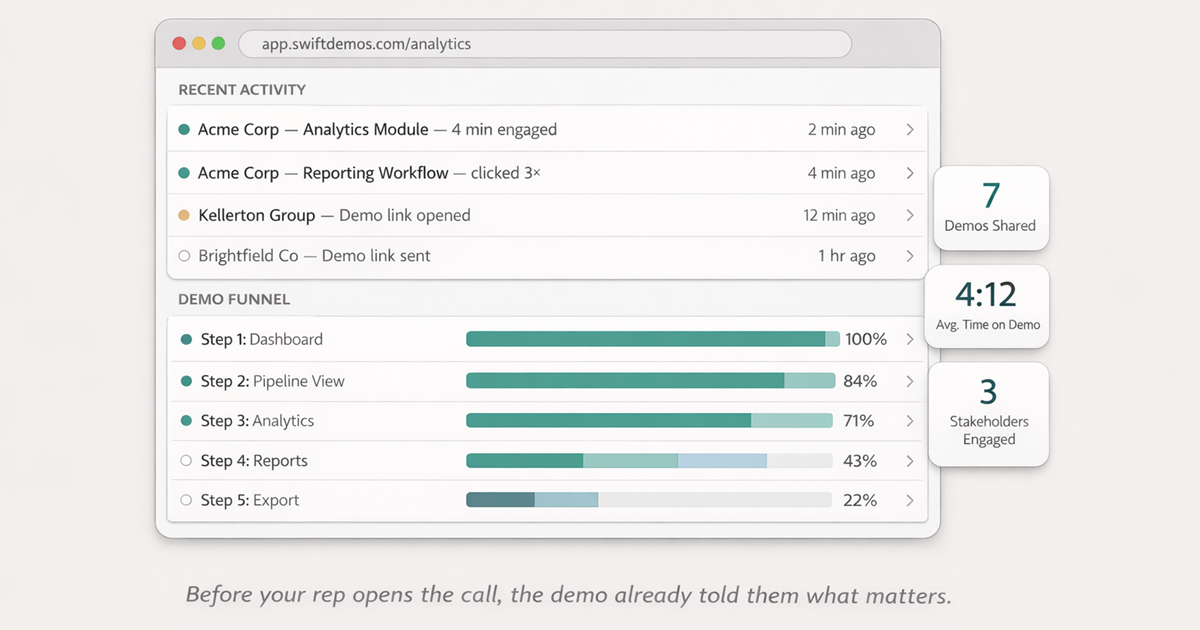
67% of B2B buyers now prefer a rep-free buying experience for at least part of their evaluation (Gartner, March 2026, n=646). That majority is building opinions about your product in places you’re not present. The teams responding to that shift aren’t picking one demo format and calling it done — they’re sequencing formats across the funnel so each stage hands off to the next. A video creates awareness; a clickable demo converts that awareness into evaluation; a personalized leave-behind turns a single champion into a buying committee.
Here’s how the handoffs work stage by stage:
| Funnel stage | Demo format | Job to be done | Handoff to next stage |
|---|---|---|---|
| Awareness | Video demo (homepage, YouTube, social) | Answer “what does this do?” in under 3 minutes | Viewer clicks through to homepage or feature page |
| Consideration | Clickable demo (homepage, feature pages, blog) | Let the buyer experience the product before any sales contact | Prospect books a call or starts a trial |
| Outbound | Personalized clickable demo (sales email) | Replace “can I get 30 minutes?” with “here’s the product now” | Reply, meeting booked, or trial started |
| Post-discovery | Leave-behind clickable demo (follow-up email) | Let the champion share the product with stakeholders who weren’t on the call | Stakeholder views tracked; next meeting scheduled |
| Post-signup | Guided product tour (inside the product) | Move new users from signup to first value milestone | Feature activation; week-1 retention |
The handoff logic is the part most teams skip. Each stage is designed to lower the cost of entry for the next one: a buyer who has already clicked through a clickable demo comes into a discovery call with a mental model of the product — the rep’s first conversation starts at evaluation, not education. A champion who has a leave-behind demo link doesn’t have to summarize the product to their CFO — they forward a link. Each demo does less selling and more qualifying, because the previous stage already did the education.
The compounding effect is the point. One demo in one place is a feature. The same format deployed at every stage, with each handoff designed, is a system that shortens the sales cycle without adding headcount.
05 - How to Create a High-Converting Product Demo
The most important structural decision in building any of these three formats is the same: start with the aha moment, not the login screen. Most demos fail because they open on navigation, menus, and settings — the structural parts of the product rather than the valuable parts. That sequence feels logical to the team who built the product. To a buyer evaluating whether it’s worth their time, it feels like work they haven’t agreed to do yet.
A high-converting demo is built backwards: identify the single interaction that makes the product’s value obvious — the moment where a prospect would say “oh, I see it now” — and build the opening step around that moment. Everything before it is cut. Everything after it supports it.
The full framework — including step-count guidance per format, guided hotspot strategy, and credible data principles — is in our guide to creating a product demo that converts. The short version for each format:
Video demo: script to the value moment in 60 seconds
Open with the outcome the prospect wants — the result, the dashboard, the report — not the navigation path to get there. State the problem in one sentence. Show the solution immediately. Keep the full video under three minutes for evaluation-stage assets; under 90 seconds for social and email. Everything after the aha moment is a feature inventory — cut it unless the buyer has already committed to watching.
Product tour: one workflow, one activation milestone
Identify the single action that correlates most with long-term retention in your product — the moment where users who complete it stay, and users who don’t leave. Build the entire tour around getting a new user to that action in as few steps as possible. Five steps is usually enough. Ten is the ceiling. Tours that try to cover the full feature set have low completion and high drop-off because users abandon the guided path to explore on their own — which is fine in an interactive demo, but fatal in an onboarding tour where the destination matters.
Clickable interactive demo: one workflow, one CTA, no dead ends
Build around the highest-value workflow in your product — the one that makes the value proposition undeniable — and offer optional guided hotspots for buyers who want direction. Use realistic data that resembles the prospect’s operating environment: plausible names, real-looking numbers, industry-appropriate context. End every demo path on a single CTA. A demo that ends without an ask is a missed opportunity at the peak of engagement. The prospect is at maximum interest immediately after the aha moment — that’s the moment to direct them to the next step.
Coda - The Format Doesn’t Matter Without the Moment
The difference between a video that gets watched and a clickable demo that moves buyers forward is not only the format. It’s whether the buyer reached a moment of genuine product understanding — the point where the product’s value stopped being described and started being experienced. That moment can happen in a video if the script gets there in time. It almost always happens faster in an interactive demo, because the buyer manufactures it themselves by clicking.
The teams pulling ahead in 2026 aren’t winning because they picked the right format. They’re winning because they deployed the right format at the right stage — a video demo for the buyer who’s still browsing, a clickable interactive demo for the prospect who’s evaluating, a guided product tour for the user who just signed up — and because every format ends at a decision point rather than fading out into a feature list.
The format is the vehicle. The aha moment is the destination. Build toward that, and the conversion follows.
FAQ - Common Questions
What is an example of an interactive product demo?
An interactive product demo example is a clickable, browser-based simulation of a SaaS product that prospects can explore without logging in. A CRM demo might let you add a contact, move them through a pipeline stage, and pull a deal report — all in a simulated environment that behaves like the real product. No sales call, no trial account, no setup. The prospect clicks; the product reacts. For the complete definition and more examples, see our guide to what an interactive product demo actually is.
What are the best interactive product demo examples for SaaS?
The best examples are grouped by format and use case: video demo for awareness, guided product tour for activation, clickable interactive demo for evaluation, homepage overview demo, feature page demo, persona workflow demo, CRM pipeline demo, outbound leave-behind demo, and blog-embedded mini demo. The common thread is focus: one audience, one workflow, one next step.
What is the difference between a video demo and an interactive product demo?
A video demo is passive — the viewer watches someone else navigate the product. An interactive demo is active — the viewer clicks through it themselves. That shift from watching to doing changes the cognitive experience entirely. In vendor benchmark data, clickable interactive demos show materially higher evaluation-stage engagement and CTA rates than passive video walkthroughs. Video wins at awareness. Interactive demos win at evaluation.
What is the difference between a product tour and a clickable interactive demo?
A guided product tour is a linear, step-by-step walkthrough designed for new users who have already signed up — it’s inside the product and guides them to their first activation milestone. A clickable interactive demo is a self-directed experience designed for prospects evaluating the product before signing up — it lives on your marketing site and lets buyers explore freely. Tours solve activation. Demos solve evaluation. Full breakdown in our product tour vs interactive demo comparison.
Which interactive product demo format converts best?
For pre-signup evaluation, clickable interactive demos tend to be the strongest format because they let prospects experience the product before a call. In vendor benchmark data, they show higher engagement and CTA rates than passive video walkthroughs. For post-signup activation, guided product tours win. Video performs best for early awareness. The right answer is all three in sequence, not a single-format choice.
Where should I embed an interactive product demo?
The five highest-impact placements are: homepage (the always-on qualifier), feature pages (focused capability proof), outbound email sequences (replaces the “30-minute call” ask), post-call follow-up emails (gives stakeholders a direct product experience), and blog posts embedded at the transition from explanation to demonstration. Start with the homepage — it’s where intent and traffic converge. The full channel strategy is covered in our guide to interactive product experiences across marketing channels.
How long should an interactive product demo be?
For a top-of-funnel SaaS demo, keep each flow to roughly 5 to 13 steps and make the first flow even tighter when possible. Navattic’s 2026 benchmark found the most frequent step count for top demos is 5 to 13 steps, while the highest-completion flows are between 1 and 6 steps. The practical rule: use the shortest path to the buyer’s aha moment.
Statistics cited reflect research from Gartner (March 2026, n=646 B2B buyers), Navattic State of the Interactive Product Demo (2026, 40,000+ demos and ~5,000 SaaS websites), Arcade interactive demo benchmark analysis (2025, 37,000 demos), Storylane / Factors.ai conversion study (2024, n=110,257 sessions, 150 deals), Wistia State of Video Report (2026, 13 million videos and 79 million viewing hours), and Mediafly data cited by Content Marketing Institute (2024). Individual results vary by product category, demo quality, and audience intent.
Build interactive demos that close deals.
No engineering team required. Go from Chrome capture to a shareable, trackable demo in minutes.
Start Free Trial